How to work out a percentage discount on a calculator
To take a percentage off a price, multiply by what’s left: 30% off $129 is 129 × 0.7 = $90.30. Plus the saving, the original price and stacked discounts.
To work out a percentage discount on a calculator, multiply the price by the discount as a decimal for the saving, and by what’s left for the sale price. For 30% off $129, 129 × 0.3 = shows 38.7, a saving of $38.70, and 129 × 0.7 = shows 90.3, a sale price of $90.30.
On stepbystepcalculator.com the % key gets the same sale price: 129 − 30% = also shows 90.3. Apart from the ACCC’s “WAS $275 NOW $149” example and Casio’s own key examples, the prices in this article are made up. Every sum was run through the calculator, so the displays quoted are the ones you’ll see there.
How do you work out the sale price after a percentage discount?
Multiply the shelf price by what the discount leaves. 30% off leaves 70%, which is 0.7 as a decimal, so 129 × 0.7 = shows 90.3 and a $129 jacket sells for $90.30. The Australian Mathematical Sciences Institute’s Consumer Arithmetic module gives the rule as “to decrease a quantity by a% we multiply by (100 − a)%”. Multiplying by 0.7 needs no % key, so it works on any calculator.
On stepbystepcalculator.com, the % key takes the discount in the order you’d say it. After + or −, the % key works out that percentage of the total so far, so 129 − 30% = shows 90.3 as well. The How it works page covers the rest of the % key.
A shelf price is the total price, with any GST already in it. The ACCC’s Price displays page says businesses “must display a total price that includes taxes, duties and all unavoidable or pre-selected extra fees”, so the percentage comes off the price as marked. To find the GST inside the $90.30, see how to take GST out of a price.
How much does a percentage discount save in dollars?
Multiply the price by the discount as a decimal. 129 × 0.3 = shows 38.7, so 30% off $129 saves $38.70. With the % key, 129 × 30% = shows the same 38.7, because after × or ÷ the % key on stepbystepcalculator.com divides the 30 by 100 first.
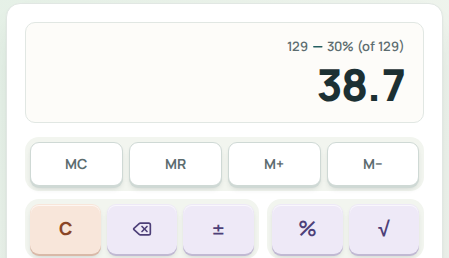
The display on stepbystepcalculator.com also shows the saving on the way to the sale price. Type 129 − 30% and, before you press =, the display reads 38.7 with “129 − 30% (of 129)” on the line over it. Press = and the display changes to 90.3. The $38.70 saving and the $90.30 sale price add back to $129.00.
Some discounts don’t land on a whole cent. For 15% off $89.95, 89.95 − 15% = shows 76.4575 and 89.95 × 15% = shows 13.4925. stepbystepcalculator.com shows up to 12 significant digits (why 12) and doesn’t round to cents, so the rounding is yours: $76.46 to pay and $13.49 saved, which add back to $89.95. Round once, at the end. The AMSI module warns that “rounding at multiple stages in a calculation may alter an answer by a small amount”.
How do you find the original price from a sale price?
Divide the sale price by what the discount left. A price after 30% off is 0.7 of the original, so 90.3 ÷ 0.7 = shows 129, and the $90.30 jacket was $129.00 before the sale. The AMSI module reverses a 34% fall in a share price the same way: “to reverse the process, we divide by 66%”. On stepbystepcalculator.com, 90.3 ÷ 70% = shows 129 too.
Adding the 30% back gives the wrong price. 90.3 + 30% = shows 117.39, which is $11.61 short of $129.00, because 30% of the sale price is $27.09 and the discount that came off was $38.70.
The same division works for any discount: 45 ÷ 60% = shows 75, so a $45 sale price after 40% off started at $75.00.
What percentage off is a marked-down price?
Take the sale price from the original price, divide the answer by the original price, then multiply by 100. The ACCC’s False or misleading claims page gives the example “WAS $275 NOW $149”. 275 − 149 = shows 126, ÷ 275 = shows 0.458181818182 and × 100 = shows 45.8181818182, so that sale offers 45.82% off, rounded to two decimal places.
Press = after the subtraction. Typed as one sum on stepbystepcalculator.com, 275 − 149 ÷ 275 × 100 = shows 220.818181818, because the calculator divides and multiplies before it subtracts. The percentage calculator takes the two prices in its “% change” mode and gives a decrease of about 45.82%, with the working.
Divide by the original price, never the sale price: the AMSI module notes that discounts “are normally expressed as a percentage of the original price”. The ACCC has a caution about the “was” price too. An advertised saving may be misleading if the product “has never been sold at the higher price”.
Why 20% off then a further 10% off is 28% off, not 30%
A further discount comes off the price that has already been reduced, so the second percentage is taken from a smaller amount than the first. 20% off leaves 0.8 of the price and a further 10% off leaves 0.9 of that. 0.8 × 0.9 = shows 0.72, so 72% of the price is left and the combined discount is 28%. The AMSI module says of repeated changes that “percentages cannot always be added”.
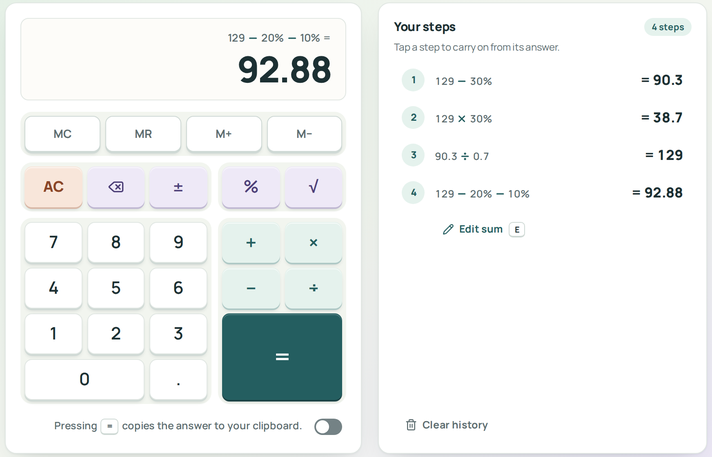
On the $129 jacket, 129 − 20% − 10% = shows 92.88. Each % after − finishes the total so far, so the 10% is taken from 103.2, the price after the first discount. $92.88 is $2.58 more than the $90.30 that a single 30% off gives. The order doesn’t matter: 129 − 10% − 20% = also shows 92.88.
| Discounts | Part of the price left | Combined discount | The two percentages added |
|---|---|---|---|
| 20%, then a further 10% | 0.8 × 0.9 = shows 0.72 | 28% | 30% |
| 25%, then a further 10% | 0.75 × 0.9 = shows 0.675 | 32.5% | 35% |
| 50%, then a further 20% | 0.5 × 0.8 = shows 0.4 | 60% | 70% |
Six discount sums for a $129 price
For a jacket marked $129 with 30% off, stepbystepcalculator.com gives these results:
| Keys | Display | What it gives |
|---|---|---|
129 × 0.7 = | 90.3 | Sale price: $90.30 |
129 − 30% = | 90.3 | Sale price, using the % key: $90.30 |
129 × 30% = | 38.7 | Saving: $38.70 |
90.3 ÷ 0.7 = | 129 | Original price: $129.00 |
90.3 + 30% = | 117.39 | Wrong: $11.61 short of the $129.00 original price |
129 − 20% − 10% = | 92.88 | 20% off, then a further 10% off: $92.88 |
stepbystepcalculator.com keeps each finished sum as a numbered step in your browser, so the sale price, the saving and the stacked discounts stay on screen together.
Casio calculators take the % key in a different order
The keys for a percentage off depend on the calculator. Casio’s manual and Casio Australia’s FAQ give two orders, and neither is the 129 − 30% = used on stepbystepcalculator.com:
| Keys for a percentage off | Calculator, and where the keys come from |
|---|---|
129 − 30% = | stepbystepcalculator.com shows 90.3. Run for this article |
3500 − 3500 × 25% = | Casio fx-82AU PLUS II, where the answer is 2625 and % is SHIFT then the ( key. Casio’s manual, Percent Calculations: “Decrease 3500 by 25%” |
200 × 10 % − | Casio desktop calculators, in Casio Australia’s CASIO Calculator FAQs: “Subtract 10%” |
129 × 0.7 = | Any calculator, by the AMSI rule: multiply by (100 − a)%. The display shows 90.3 on stepbystepcalculator.com |
The fx-82AU PLUS II order works on stepbystepcalculator.com as well: 3500 − 3500 × 25% = shows 2,625. The order in Casio Australia’s FAQ doesn’t. 129 × 30% − shows 0.3 and waits for another number. On a calculator you don’t know, multiply by the decimal and leave the % key alone.
This article covers the arithmetic only and is general information, not financial advice (see the terms of use).
Sources
- Consumer Arithmetic (Australian Mathematical Sciences Institute, The Improving Mathematics Education in Schools (TIMES) Project, Module 22, June 2011): percentage decrease, reversing a decrease, discounts, repeated changes and rounding at the last step.
- Price displays (Australian Competition and Consumer Commission, accessed 17 November 2026): the displayed price must be a total that includes taxes.
- False or misleading claims (Australian Competition and Consumer Commission, accessed 17 November 2026): the “WAS $275 NOW $149” example, and when an advertised saving may mislead.
- Percent Calculations (Casio, fx-82AU PLUS II online manual, copyright 2020, accessed 17 November 2026): the keys for “Decrease 3500 by 25%”.
- CASIO Calculator FAQs (CASIO Australia, run by Shriro Australia, the official distributor for CASIO calculators in Australia, accessed 17 November 2026): the keys under “How to do a percentage calculation?”.